A review queue can fit neatly on a phone and still leave the reviewer guessing which item to open. Hiding a column solves the space problem; whether it solves the user’s problem depends on what was in the column.
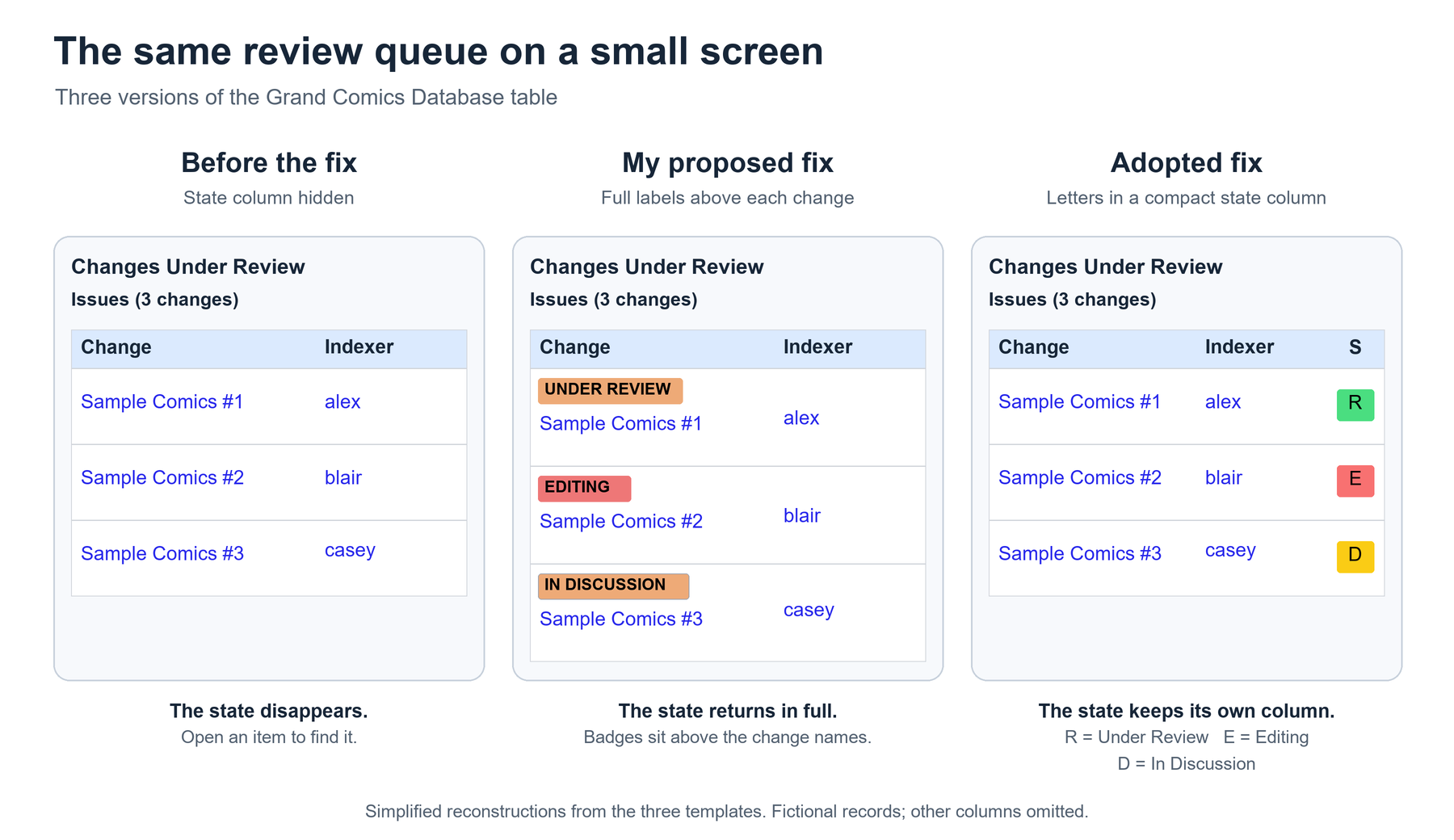
In the Grand Comics Database‘s Changes Under Review queue, the State column disappeared on narrow screens, which hid the distinctions between Under Review, Editing, and In Discussion. The changes were still listed, but information useful for choosing one was missing from the list.
I added compact state labels above the change names on small screens. A maintainer took a different approach: keep the State column, show a letter for each state, and use three different colors. The pull request records both versions. My contribution addressed the missing information; the maintainer revised how it was presented.
The placement of my labels wasn’t the requirement; a reviewer just needed to distinguish the states before opening a change. We could move the information or shorten its presentation, provided that distinction survived.
Here’s a fictional example outside the comics database. A document queue has one item ready for review, one being edited, and one with an unresolved discussion. You have time to review one document. On the wide screen, the states help you choose where to start; on the narrow screen, hiding them turns that choice into a small tour of documents you may not need to open. The table has saved space by spending your time.
Before hiding a column, ask what someone does with it. Do they need the information to choose a record, or only after they’ve chosen one? A short status can matter more to that decision than a long description, and “number of characters” is a poor measure of importance.
There are several ways to keep the information available. Put the state beside the item name, give it a compact column, or use a different layout for each record. If the task requires comparing many values across rows, horizontal scrolling may be more useful than hiding half the comparison. Choose the layout around what the reader needs to do.
Shortening a label creates another question: will someone understand the shorter version? E, D, and R are different letters, but their meanings still need to be available. Color can reinforce the distinction; W3C’s guidance on use of color explains why it shouldn’t carry the meaning by itself. A visible key or room for the full words may help someone who doesn’t already know the queue.
For my original GCD change, the recorded checks included four template tests and a desktop browser’s mobile emulation, including the transition between widths of 639 and 640 pixels. Those checks covered my labels, but they didn’t establish that the maintainer’s later presentation passed a screen-reader check or worked on a physical phone.
For a change like this, test the point where the presentation switches. Put each state in the queue and move through the boundary in both directions. Does a label disappear before its replacement appears? Does the same row still mean the same thing? Then check how the resulting information reads with a screen reader, whether the actions work from a keyboard, and what happens with zoom and on the devices people use.
Give someone the narrow version and ask them to choose an item to work on. If they have to open several records to recover information the wide version supplied, you’ve found the next layout change.
—jhunterj