If an event organizer tells you a run starts at 1:30 a.m. on Sunday, November 1, they have given you a date and a time. What they haven’t given you is a timestamp.
In any region that observes daylight saving time, 1:30 a.m. on the first Sunday of November happens twice. When the clocks “fall back” from 2:00 a.m. to 1:00 a.m., the entire hour between 1:00 and 2:00 repeats. Without knowing whether that 1:30 a.m. belongs to Eastern Daylight Time (UTC-4) or Eastern Standard Time (UTC-5), an application cannot translate that human wall-clock time into a specific instant in time.
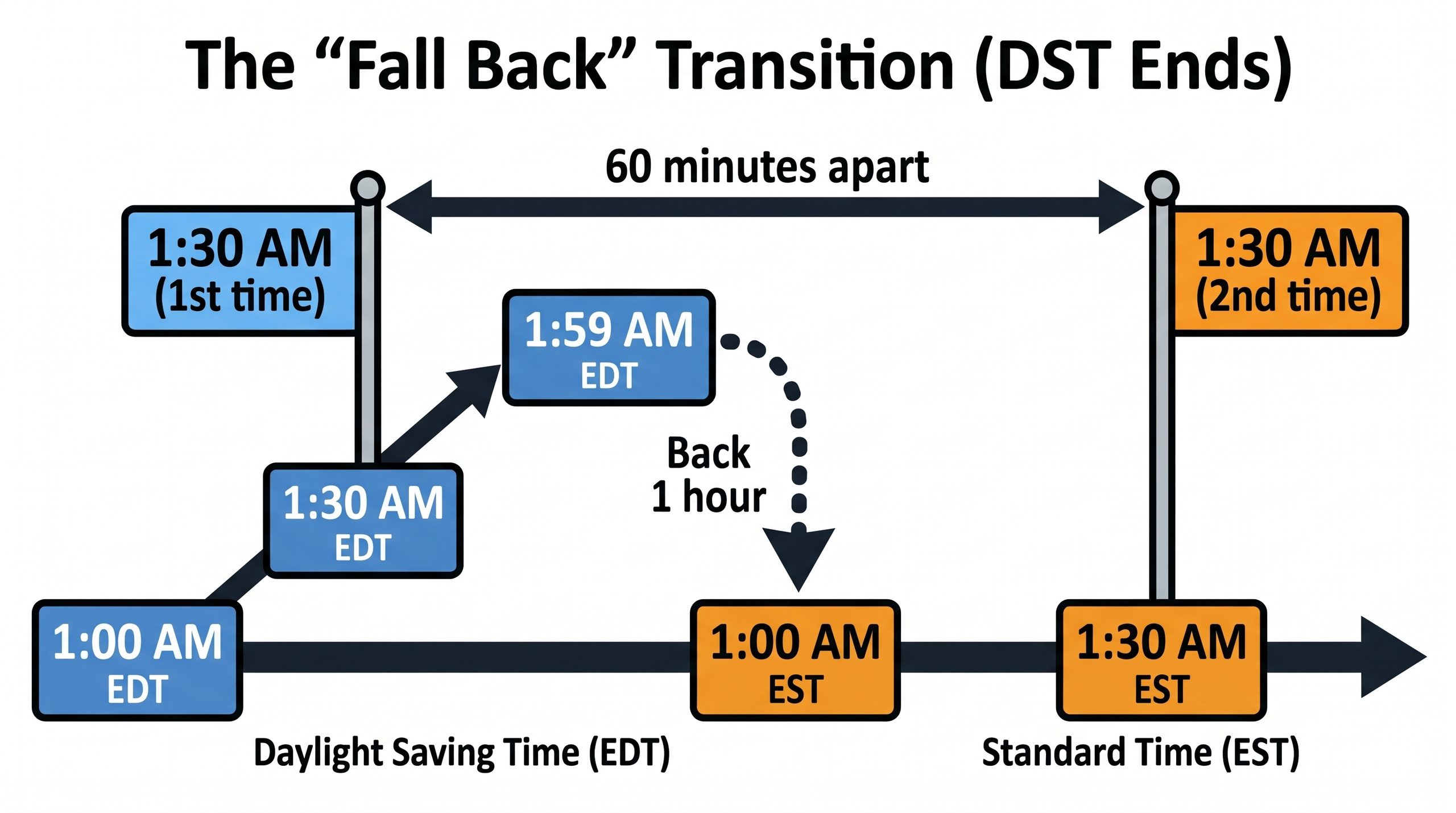
The reverse happens in the spring: when the clock jumps from 1:59 a.m. directly to 3:00 a.m., 2:30 a.m. simply never occurs. If a scheduled task or form entry records 2:30 a.m. on that date, it has recorded an impossible clock reading.
The trouble usually begins when a system takes a date picker field and a time input field and immediately combines them into a standard UTC timestamp in the browser:
- Civil time is an agreement about human clocks. It consists of a local calendar date and a time of day, like
2026-11-01 01:30:00. It is meaningful only within a specific jurisdiction or timezone. - An instant is a point on the universal timeline. It tells you exactly when something occurred relative to UTC, such as
2026-11-01T05:30:00Z. - A timezone is a set of historical and future offset rules. An offset like
-05:00tells you the offset right now, but an IANA timezone identifier likeAmerica/New_Yorktells you how that offset changes across seasons and across historical legislation.
When an application converts civil input directly to UTC on save without storing the intended timezone and context, it discards critical intent. If the event is scheduled months in advance and the government alters daylight saving rules in the interim, your converted UTC timestamp is suddenly an hour off when mapped back to the local wall clock. Conversely, if you store only the local string without resolving ambiguous hours, chronological sorting breaks because two distinct events share the same clock reading sixty minutes apart.
Handling human event time safely requires an explicit data contract:
- Store both the local civil time and the timezone identifier. If an event happens at 1:30 in Dayton, store
2026-11-01 01:30:00alongsideAmerica/New_York. Do not rely on the browser’s current local timezone to guess what the user meant. - Explicitly handle gaps and folds. When a user enters a time in the repeated autumn hour, ask which 1:30 they mean (the first one before the shift, or the second one after it), or record an explicit disambiguation flag (often called a
fold). If they enter a time during the missing spring hour, reject the entry or explain how the system shifts it forward. - Derive the UTC instant for scheduling, but keep the source civil record authoritative. The calculated instant is what drives your background worker or reminders, but the local date, time, and timezone remain the authoritative record of what the organizer announced.
A timestamp tells you when an event happened in the universe; a date and a time tell you what the clock on the wall said. Keeping those two concepts separate will save you from having to explain why your morning reminder sent an hour early, or why an overnight event vanished into a missing hour.
—jhunterj