When an editor typing into a long catalog form triggers an autocomplete search, they expect a dropdown of matching names. What they do not expect is a silent freeze or a generic “network error” because an intermediary security service decided to challenge their browser.
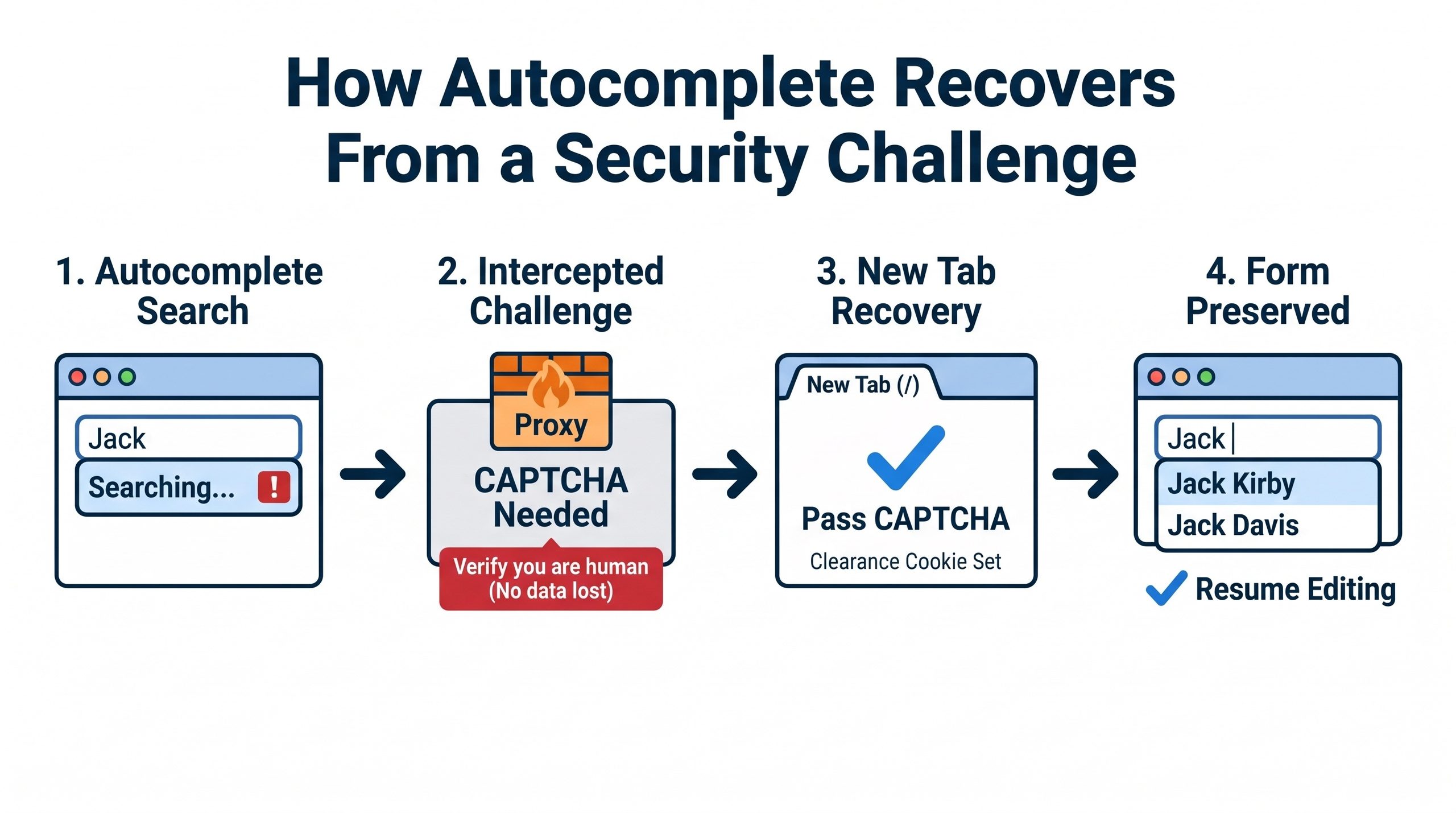
In complex web applications protected by services like Cloudflare, background AJAX requests can be intercepted by a security challenge. If a user has been working quietly on an editing screen for an hour, their session token or security clearance may expire. The next keystroke in an autocomplete field fires an asynchronous request expecting a JSON payload:
json[{"id": 142, "name": "Jack Kirby"}, {"id": 883, "name": "Jack Davis"}]
Instead of JSON, Cloudflare intercepts the request and responds with a full HTML challenge page asking the visitor to solve a turnstile or verify they are human.
To the browser’s JavaScript autocomplete widget, receiving an HTML document with HTTP status 200 or 403 when it parsed for JSON is simply a parse failure. The widget crashes quietly, clears the menu, or logs an unhelpful error to the console. If the user notices at all, their first instinct is often to reload the page, possibly wiping out twenty minutes of unsaved catalog notes, issue numbers, and creator credits.
A broken autocomplete dropdown is an inconvenience; destroying an editor’s active work to satisfy a security barrier is a defect.
Handling this cleanly requires the application to recognize that the response came from an intermediary security proxy rather than its own API:
- Inspect response headers for mitigation signals. Intermediaries usually identify themselves. When Cloudflare challenges a request, it attaches a
cf-mitigated: challengeresponse header. By attaching a lightweight global listener to the framework’s AJAX completion hook (such as jQuery’sajaxComplete), the front end can detect the challenge without needing tailored error handling on every single autocomplete input across the site. - Warn the user without clearing the page. When a challenge response arrives, the listener reveals a persistent, translated alert banner at the top of the editing viewport. The alert explains what happened in plain terms: verification is required before background lookups can resume.
- Offer an out-of-band recovery path. Never send the user through the challenge URL itself, which was an internal JSON endpoint meant for machines. Instead, give them a link to the site root (
/) configured to open in a new browser tab withtarget="_blank"andrel="noopener". - Preserve the current editing state. In that second tab, the user completes the security check, receives a fresh clearance cookie from Cloudflare, and closes the tab. Back in the original tab, their form inputs, checkbox states, and pending text remain intact. The user resumes typing, the next autocomplete query succeeds with the refreshed session clearance, and nothing is lost.
Testing this kind of integration requires honesty about your test fixtures. In local Docker development and automated staging runs, you cannot always trigger a genuine production security challenge on demand. For PR #734 on the Grand Comics Database, I verified the template placement, global listener guarding, and translated strings, and tested the behavior using a browser-side simulated challenge that returned the exact header and HTML structure. That demonstrates the UI responds correctly to the contract; it does not claim to eliminate all real-world browser edge cases.
Security proxies are designed to protect servers, but web applications exist to help people get work done. When an intermediary steps in front of your API, make sure your interface knows how to step around it without taking your user’s afternoon with it.
—jhunterj