Putting a staging environment behind an outer sign-in gate keeps unauthorized visitors and search crawlers out, but it also creates a second authentication layer in front of whatever security the application already has. If those two layers are not designed together, the gate can hide real bugs, break automated tasks, or make you think an authenticated workflow works when it only passed the gate.
For example, say an application uses an Authorization: Bearer <token> header for its API calls, while the staging boundary uses an OAuth proxy or an HTTP basic access authentication prompt to protect the whole site. A developer logs into staging in their browser, gets a session cookie for the outer proxy, and tests an administrative action. The action succeeds. But when an automated background task or an external webhook attempts the same request, the proxy intercepts the call and returns an HTML login page instead of letting the application evaluate the bearer token.
The problem runs both ways. The outer gate can also hide permission failures inside the application. If every staging request is forwarded with a shared administrative header injected by the proxy, tests may pass simply because the proxy promoted everyone to an administrator.
| Layer | What it protects | How it authenticates | What failure looks like |
|---|---|---|---|
| Staging gate | The staging host and infrastructure | Proxy session cookie, IP allowlist, or basic auth | Redirect to proxy login or 401 Unauthorized |
| Application | User accounts and data boundaries | Bearer token, application session, or role check | Application JSON error or 403 Forbidden |
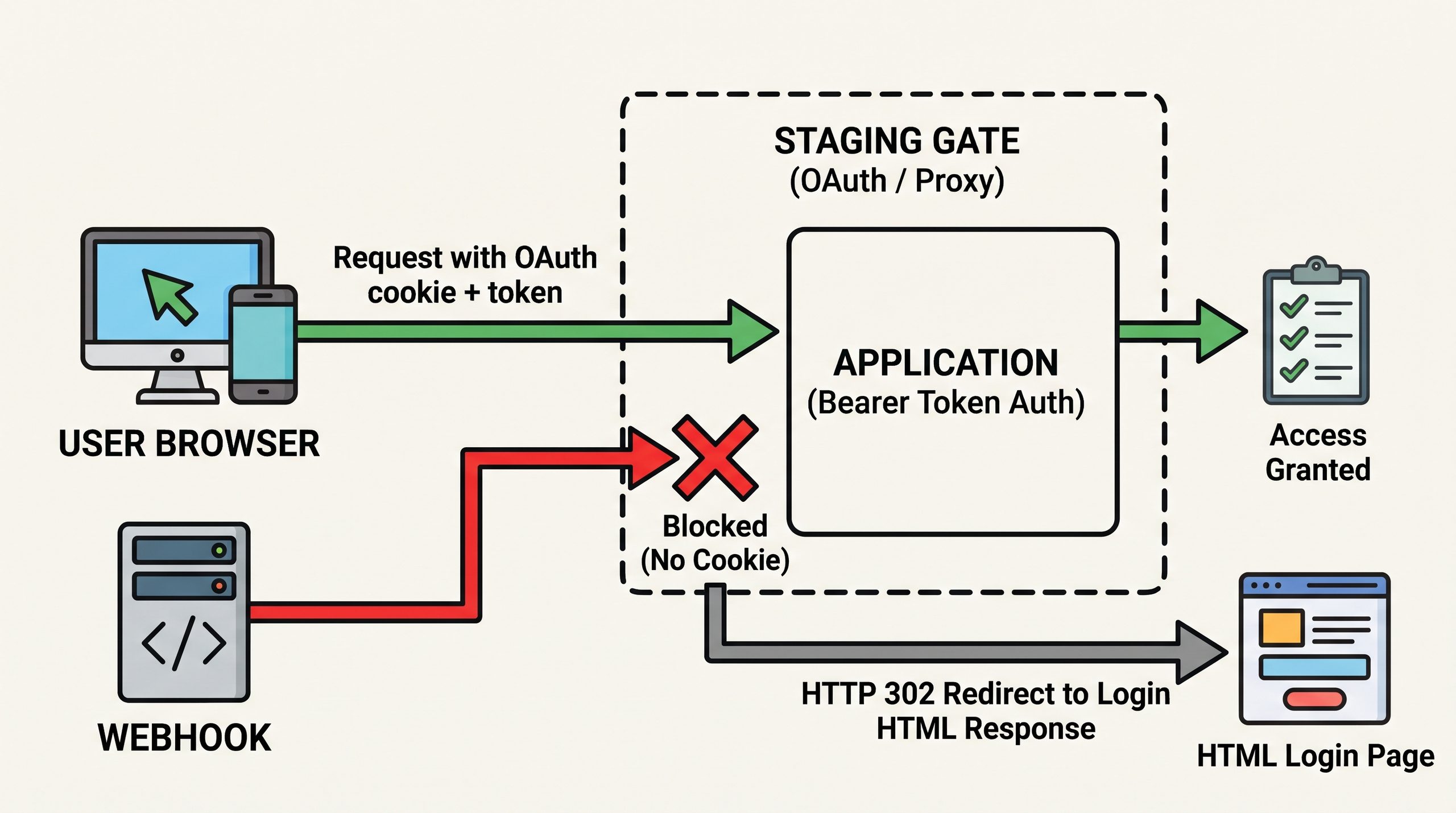
Keeping these two boundaries distinct requires deliberate rules for staging traffic:
- Pass API credentials through to the application. Outer reverse proxies should be configured to preserve the
Authorizationheader rather than stripping or overwriting it. - Give automated callers an explicit path. If a background job or webhook needs to reach staging, provide a dedicated bypass rule (like a restricted network path or a secondary client certificate) rather than turning off authentication everywhere.
- Suppress destructive side effects without breaking authorization. Staging needs to test the application’s actual email-sending or payment code paths without sending live emails to customers or making real charges. A mock transport or a sandbox sink lets the application verify permissions without creating real-world noise.
- Test both rejection and success. Verify that an invalid application token returns the expected application error code, not an outer proxy redirect. If an unauthorized user gets redirected to a Google login page instead of seeing “access denied”, your API client will probably crash trying to parse HTML as JSON.
Asset loading can also trip over the boundary. If fonts, preview images, or worker scripts are hosted on a separate subdomain or storage bucket that shares the same proxy rules, a browser that hasn’t separately authenticated to that asset host can fail to load them, showing broken icons or missing styles that never occur in production.
Before you consider staging ready for acceptance testing, trace a complete request from outside the gate all the way to the database. Make sure the application is answering for its own decisions.
—jhunterj